PRACTICAL PLAYA · AT THE CARD TERMINAL
Paying by card in Playa del Carmen: choose pesos.
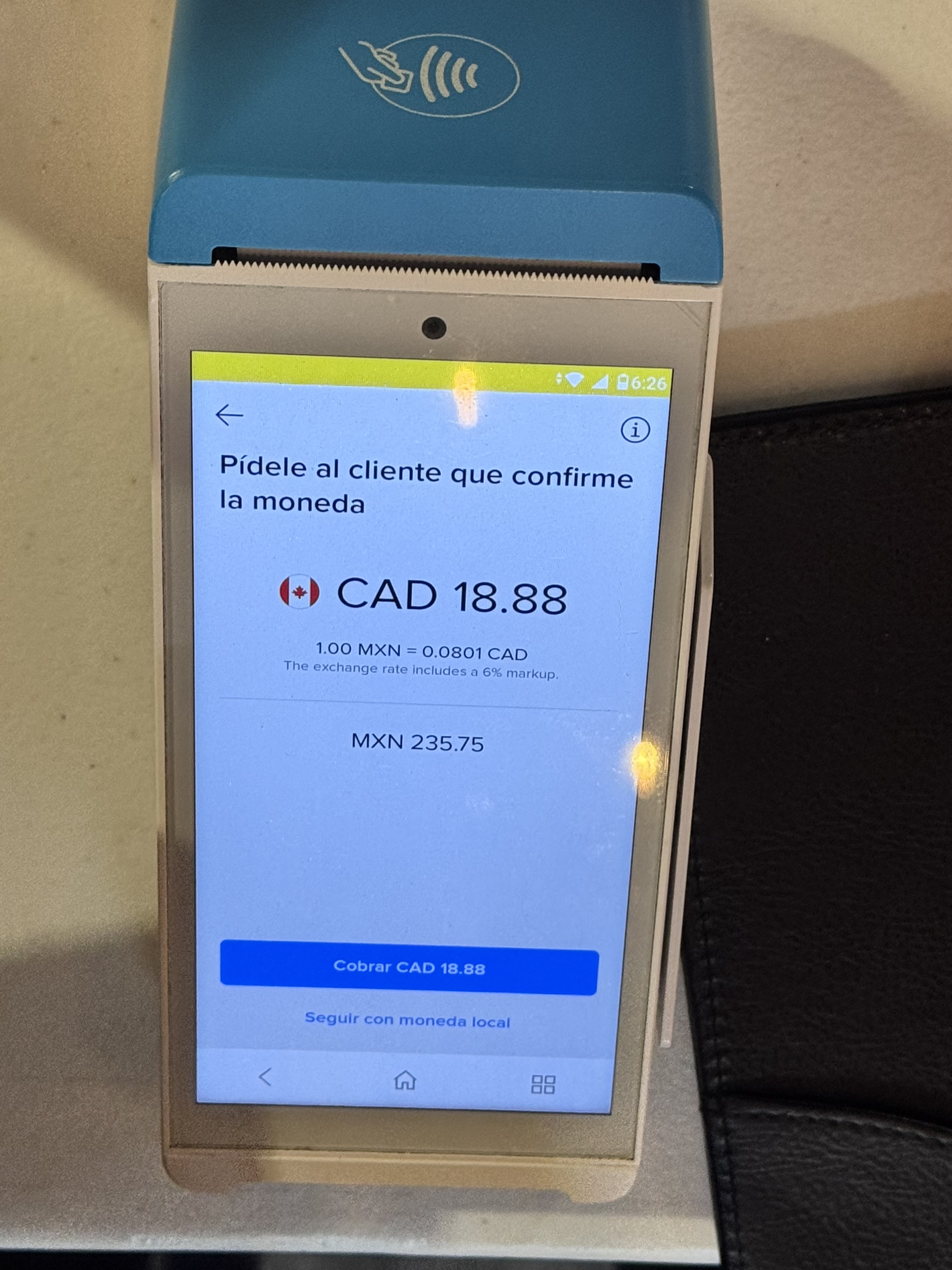
A card terminal may offer to convert a peso amount into your card’s currency. Our practical recommendation in Playa del Carmen is to choose Mexican pesos (MXN) and decline that optional conversion. This photograph shows the choice to look for.
Choose MXN / moneda local. Decline the terminal’s conversion.
On the screen
Read the real screen
The terminal offers a CAD conversion of an amount in Mexican pesos. Here are the figures shown in the photograph:
- Local amount
- MXN 235.75
- CAD conversion offered
- CAD 18.88
- Displayed exchange rate
- 1.00 MXN = 0.0801 CAD
- Disclosed markup
- 6%, included in the exchange rate
Choose “Seguir con moneda local”
That lower option continues in MXN. The blue “Cobrar CAD 18.88” button accepts the CAD offer. Read the words and currency code instead of following the button color.
The photo records a conversion offer, not a completed charge. Your card’s terms determine the cost of the MXN alternative.
Look for the currency on other terminals, too.
Wording and layouts vary. Look for MXN, Mexican pesos, moneda local or without conversion to keep the payment in pesos. The alternative may offer USD, CAD, EUR, GBP or another currency. A $ sign alone is ambiguous in Mexico, so check the currency code and make the choice yourself. [2]
Why decline conversion?
This service is called dynamic currency conversion (DCC). The merchant or payment provider offers its own exchange rate. Choosing MXN leaves conversion to your card network and issuer under your card’s terms. Santander recommends local currency because DCC usually costs more. Your bank may still charge foreign-transaction or currency fees; paying in pesos does not guarantee a fee-free purchase. [1][3]
The 6% is already included.
The screen says, “The exchange rate includes a 6% markup.” Do not add another 6% to CAD 18.88. This disclosure describes the offered rate; it does not prove that choosing MXN would save exactly 6%. That comparison depends on the rate and fees your card would apply. A network currency calculator can help estimate the alternative, but it cannot guarantee your final statement amount. [3]
Check before you approve the payment.
Confirm the amount, any agreed tip and MXN on the screen. If the currency is unclear, ask before approving. Declining DCC rejects the conversion offer and does not itself prevent a card purchase. Keep the receipt and check the currency charged against your card statement. [2]
Already charged in another currency?
Ask the merchant whether the transaction can be cancelled and processed in MXN. Do not assume a cancellation is possible or immediate: request confirmation before agreeing to another charge, to reduce the risk of paying twice. Keep the original and any cancellation receipt. If the currency was chosen without your agreement or the issue remains unresolved, contact your card issuer.
If your account is already in MXN and the bill is charged in MXN, this foreign-currency choice usually does not arise.
Sources
Primary guidance from the card networks and Santander. The practical recommendation is to pay in MXN; your own card terms still determine the final conversion and any fees.